
Post wiki changes
in Slack channels
Connect a page with children, or a whole wiki, to a Slack channel and choose what it receives: pages created, updated or deleted, comments, annotations and the events of installed applications.

Post the changes of your wiki in Slack channels, with the details shown only when everyone in the channel may view them. Link accounts and connect pages from Slack, without exposing your wiki to the internet.
Keep teams informed in the channels they already use, with the access rights of the wiki applied.
Connect a page with children, or a whole wiki, to a Slack channel and choose what it receives: pages created, updated or deleted, comments, annotations and the events of installed applications.
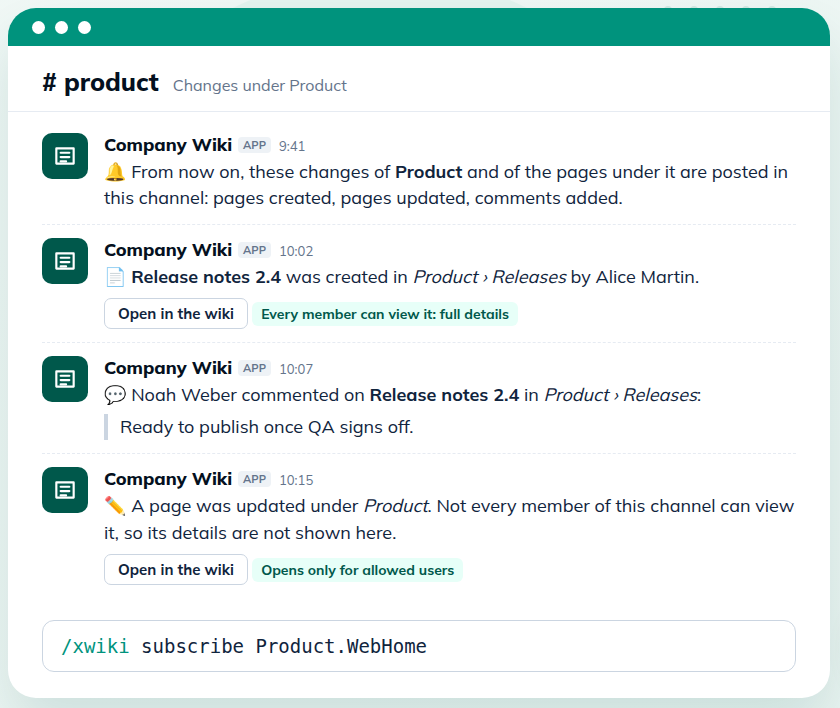
A change is posted with its details only when every member of the channel can view the page. Otherwise the channel gets a neutral message with a protected link.
Link accounts, connect pages to channels and list subscriptions without leaving Slack. Only the person who types a command sees the answer.
Type /xwiki search to find the pages of the wiki you can view, with their location and a link to all the results.
A link to a wiki page posted in Slack gets a preview with its title, location and the start of its text, only when everyone in the conversation can view the page.
Each user confirms the link by logging into the wiki, including the local users of subwikis, who get a code in their own wiki. Nothing is matched automatically by email address or name.
The wiki opens an outgoing connection to Slack with Socket Mode, so it works behind a firewall without exposing the wiki to the internet.
Your organization creates its own Slack app from a manifest prepared by the wiki. No Agnease server sees your content.
The Slack section of the wiki administration creates the app in Slack with its settings filled in. The administrator installs it, pastes its two tokens into the wiki and checks the connection.
One Slack workspace is connected to the whole wiki farm, and each wiki keeps its own Slack data: the links of its users, the channels of its pages and the messages posted for them. The tokens are encrypted before they are saved and never displayed again.
The administration of each wiki lists the messages posted in Slack for its pages, and why a message was posted without details.
Note: When a new version needs more permissions, the Slack administration lists the missing ones, and the app is updated from the new manifest.
Choose what each channel follows, and let the wiki decide what each channel may see.
The administrators of a page, or of the wiki, members of the channel, choose what it receives.
The members of the channel are checked each time a page is posted.
Everyone in the workspace can type /xwiki in a channel or a direct message.
A connected page announces the changes it posts, then each change is posted in full or without its details, depending on the members of the channel.
The name of the app in Slack is chosen by your administrator, the name of the wiki by default.
Find installation steps, the creation of the Slack app, account linking, the changes posted in channels, security, server settings and troubleshooting.
Share your XWiki version, wiki farm setup, network constraints and the channels your teams use. Agnease can help review compatibility and deployment.
No. The wiki opens the connection to Slack with Socket Mode and keeps it open. The server only needs outgoing HTTPS and WebSocket connections to slack.com and its subdomains.
The title, location and author of a change, and the text of a comment or annotation, are posted only when every member of the channel can view the page, checked when the message is posted. Otherwise the channel learns only that something changed, with a link that opens the page for the users allowed to view it.
No. Your Slack administrator creates the app in your own workspace from a manifest prepared by the wiki. The wiki talks to Slack directly, without any third-party server.
XWiki 16.10 and later. The extension is installed on the whole wiki farm from the Agnease extension repository, and the Slack app is connected in the main wiki.
English, French, German, Dutch, Spanish, Italian and Brazilian Portuguese. The wiki pages follow the language of each user, and the messages posted in Slack use the default language of the main wiki.
Connect each migrated page to the channel its space used, from the page administration or with /xwiki subscribe, and choose the same changes: pages created, updated or deleted, comments and annotations. A channel that followed a whole space can follow the whole wiki too.
Yes. Each wiki of the farm keeps its own Slack data and channels. The local users of a subwiki link their Slack account from the Slack section of their profile, in their own wiki: they get a code and type it in Slack.
Tell us about your wiki and your Slack workspace. We can help with the right configuration.